Mennyiségi kedvezmény
TOP termék!

Nettó ár:
Egyedi ár
Bruttó ár:
Egyedi ár
db
Mennyiségi kedvezmény
TOP termék!

Nettó ár:
Egyedi ár
Bruttó ár:
Egyedi ár
db
Kifutó
Mennyiségi kedvezmény
Ár a készlet erejéig

PENOSIL 878 Polisztirol és gipszkarton ragasztó kézi- és pisztolyhab 750 ml
Cikkszám
A6222
Csomagolás
12 / 840
Nettó ár:
Egyedi ár
Bruttó ár:
Egyedi ár
db
TOP termék!

Nettó ár:
Egyedi ár
Bruttó ár:
Egyedi ár
db
Mennyiségi kedvezmény

Nettó ár:
Egyedi ár
Bruttó ár:
Egyedi ár
db
Mennyiségi kedvezmény

Nettó ár:
Egyedi ár
Bruttó ár:
Egyedi ár
db
Új
Beérkezés : Augusztus utolsó hete

Nettó ár:
Egyedi ár
Bruttó ár:
Egyedi ár
db
Mennyiségi kedvezmény
TOP termék!

Nettó ár:
Egyedi ár
Bruttó ár:
Egyedi ár
db
Mennyiségi kedvezmény
Ár a készlet erejéig

Nettó ár:
Egyedi ár
Bruttó ár:
Egyedi ár
db
Mennyiségi kedvezmény
TOP termék!

Nettó ár:
Egyedi ár
Bruttó ár:
Egyedi ár
db
Kifutó
Mennyiségi kedvezmény
TOP termék!

Nettó ár:
Egyedi ár
Bruttó ár:
Egyedi ár
db
Kifutó
Mennyiségi kedvezmény
TOP termék!

Nettó ár:
Egyedi ár
Bruttó ár:
Egyedi ár
db
Kifutó
Mennyiségi kedvezmény
TOP termék!

Nettó ár:
Egyedi ár
Bruttó ár:
Egyedi ár
db
Mennyiségi kedvezmény
Ár a készlet erejéig

Nettó ár:
Egyedi ár
Bruttó ár:
Egyedi ár
db
Mennyiségi kedvezmény
Ár a készlet erejéig!

Nettó ár:
Egyedi ár
Bruttó ár:
Egyedi ár
db
Mennyiségi kedvezmény
Ár a készlet erejéig

Nettó ár:
Egyedi ár
Bruttó ár:
Egyedi ár
db
Mennyiségi kedvezmény

Nettó ár:
Egyedi ár
Bruttó ár:
Egyedi ár
db
*A csillaggal jelölt dátum a beszállítói raktárunkba a következő szállítmány beérkezésének dátuma (HH.NN)
Rendelés beolvasása fájlból
Lépésről lépésre
1. Hozza létre az Excel vagy Word dokumentumot, amiben csak a cikkszám és a megrendelni kívánt mennyiség szerepeljen (Excel minta; Word minta).
2. Mentse el .xls; .csv (pontosvesszővel tagolt), vagy .txt fájl típusként.
3. Kattintson a „Fájlbeolvasás” gombra, majd válassza ki a betölteni kívánt fájlt.
4. Kattintson az „Adatfeldolgozás” gombra.
5. Feldolgozás után megjelenik a terméklista. A beazonosított termékek előtt „Ok”, felirat jelenik meg, a beazonosíthatatlan termékeket nem importálja a rendszer. Amennyiben javítani kíván a listán, kattintson a „Mégse” gombra. Ilyenkor újból be kell tölteni a fájlt. Abban az esetben, ha a rendelést folytatni kívánja, kattintson a „Kosárba rakom” gombra.
Előfordulhat, hogy bizonyos cikkszámokat nem tud rendeléssé varázsolni (beazonosítani) a beolvasó, ilyenkor azt írja piros sávban: „Hibás adat”. Ennek több oka is lehet:
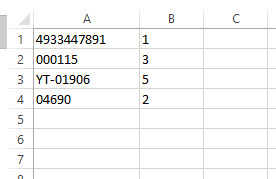
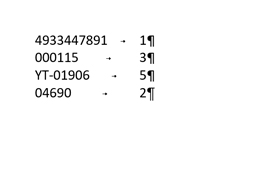
- nem találja meg a cikkszámot a rendszerünkben (pld lemaradt az elejéről egy 0)
- a cikk kontraktusos, azaz csak pld. 12-esével lehet rendelni, így a 28-at nem tudja beolvasni a rendszer.
6. Legvégül nyomja meg a „Megrendelem” gombot, vagy ha még válogatna termékeinkből, akkor a Rendelés folytatása gombot. Ilyenkor a helyesen beolvasott file-ok belekerülnek a kosárba és még szabadon tehet mellé vagy változtathat a termékeken.